What is the voting widget?
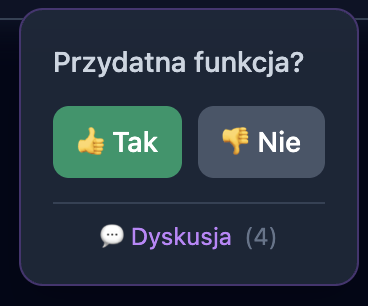
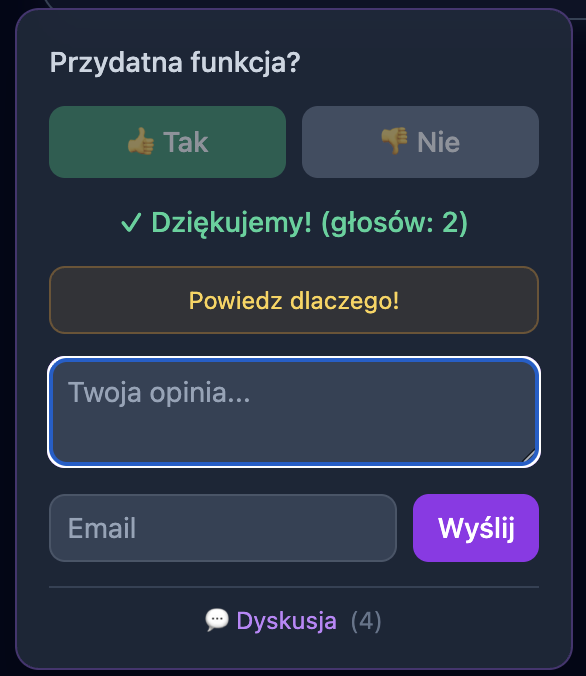
The voting widget allows you to collect user feedback directly on marketing pages or in external applications. Users can vote on whether a particular feature is useful to them, and their votes go to the Sugester Forum.
How does it look?
Before voting
After voting
Widget features
- Voting - “Yes” / “No” buttons
- Vote counter - shows how many people have voted after voting
- Comments - ability to add a text opinion
- Link to discussion - redirects to the full thread on the forum
Prompt for LLM (Claude, ChatGPT, etc.)
If you are using LLM to code the page, you can use this prompt:
Add a voting widget to my page. The widget should:

1. Display the question "Is this feature useful?" with "Yes" / "No" buttons
2. After voting, show the number of votes and a link to the discussion
3. Send the vote to the endpoint: POST {FORUM_URL}/rate?helpful=yes|no
4. Retrieve data from: GET {FORUM_URL}.json (returns rating, comments_count)

Where {FORUM_URL} is the path to the entry in the Sugester Forum, e.g.:
/forum/suggestions/feature-name-ABC123

The widget should be:
- Compact (max 280px wide)
- In dark theme (slate/purple) or matching the page
- Responsive (fixed on mobile, float-right on desktop)

Mapping pages to forum entries:
- /features/my-feature → /forum/suggestions/my-feature-TOKEN
Where does it work?
| Environment | Works? | Notes |
|---|---|---|
| Pages in Sugester/Intum CMS | ✅ Yes | Full integration |
| NOE applications | ✅ Yes | Full integration |
| External pages (self-hosted) | ✅ Yes | Requires CORS or proxy |
| Other CMSs (WordPress, etc.) | ⚠️ Partially | Backend must be Sugester |
Backend requirements:
- Sugester/Intum Suggestions Forum
- Endpoint
/ratewith CSRF protection disabled (skip_forgery_protection) - Endpoint
.jsonreturningratingandcomments_count
Embed code
To embed the widget on your page, add the following HTML and JavaScript code:
1. Widget HTML
<!-- Voting widget -->
<div id="voting-widget" class="hidden">
  <div class="voting-box">
    <p class="voting-question">Is this feature useful?</p>
    <div id="vote-buttons" class="voting-buttons">
      <button onclick="vote('yes')" class="voting-btn btn-yes">👍 Yes</button>
      <button onclick="vote('no')" class="voting-btn btn-no">👎 No</button>
    </div>

    <div id="forum-link" class="hidden">
      <a id="forum-link-href" href="#" target="_blank">
        💬 Discussion <span id="comment-count"></span>
      </a>
    </div>
  </div>
</div>
2. JavaScript
(function() {
  // Configuration - change to your values
  const FORUM_BASE = 'https://your-domain.com/forum/suggestions';

  const entryMap = {
    '/features/my-feature': {
      path: FORUM_BASE + '/my-feature-ABC123',
      id: 123
    },
    // add more mappings...
  };

  const path = window.location.pathname.replace(/\/$/, '');
  const entry = entryMap[path];

  if (entry) {
    document.getElementById('voting-widget').classList.remove('hidden');
    window.currentEntry = entry;

    // Link to forum
    document.getElementById('forum-link-href').href = entry.path;
    document.getElementById('forum-link').classList.remove('hidden');

    // Fetch comment count
    fetch(entry.path + '.json')
      .then(r => r.json())
      .then(data => {
        if (data.comments_count > 0) {
          document.getElementById('comment-count').textContent =
            '(' + data.comments_count + ')';
        }
      })
      .catch(() => {});
  }

  window.vote = async function(helpful) {
    const btns = document.querySelectorAll('.voting-btn');
    btns.forEach(b => b.disabled = true);

    try {
      await fetch(window.currentEntry.path + '/rate?helpful=' + helpful,
        { method: 'POST' });

      // Fetch current rating
      const data = await fetch(window.currentEntry.path + '.json')
        .then(r => r.json());
      const rating = data?.rating || 0;

      let msg = '✓ Thank you!';
      if (rating > 0) {
        msg = helpful === 'yes'
          ? '✓ ' + rating + ' people want this feature'
          : '✓ Thank you! (votes: ' + rating + ')';
      }

      document.getElementById('vote-result').textContent = msg;
      document.getElementById('vote-result').classList.remove('hidden');
      document.getElementById('vote-buttons').style.opacity = '0.5';
    } catch(e) {
      document.getElementById('vote-result').textContent = 'Error - please try again';
      document.getElementById('vote-result').classList.remove('hidden');
      btns.forEach(b => b.disabled = false);
    }
  };
})();
3. CSS Styles
.voting-box {
  padding: 1rem;
  background: rgba(30, 41, 59, 0.9);
  border-radius: 0.75rem;
  border: 1px solid rgba(168, 85, 247, 0.3);
  max-width: 280px;
}
.voting-question {
  color: #cbd5e1;
  font-size: 0.875rem;
  margin-bottom: 0.75rem;
}
.voting-buttons {
  display: flex;
  gap: 0.5rem;
}
.voting-btn {
  flex: 1;
  padding: 0.5rem 0.75rem;
  font-size: 0.875rem;
  font-weight: 500;
  border-radius: 0.5rem;
  border: none;
  cursor: pointer;
  white-space: nowrap;
}
.btn-yes { background: #059669; color: white; }
.btn-yes:hover { background: #10b981; }
.btn-no { background: #475569; color: white; }
.btn-no:hover { background: #64748b; }
#vote-result {
  color: #10b981;
  font-size: 0.875rem;
  margin-top: 0.75rem;
}
#forum-link a {
  color: #a78bfa;
  font-size: 0.75rem;
}
.hidden { display: none; }
Technical requirements
- Entry in the Suggestions Forum with public access enabled
- Endpoint
/ratewith CSRF protection disabled (skip_forgery_protection) - Endpoint
.jsonreturningcomments_countandrating - CORS configured if the widget is on a different domain