Organization
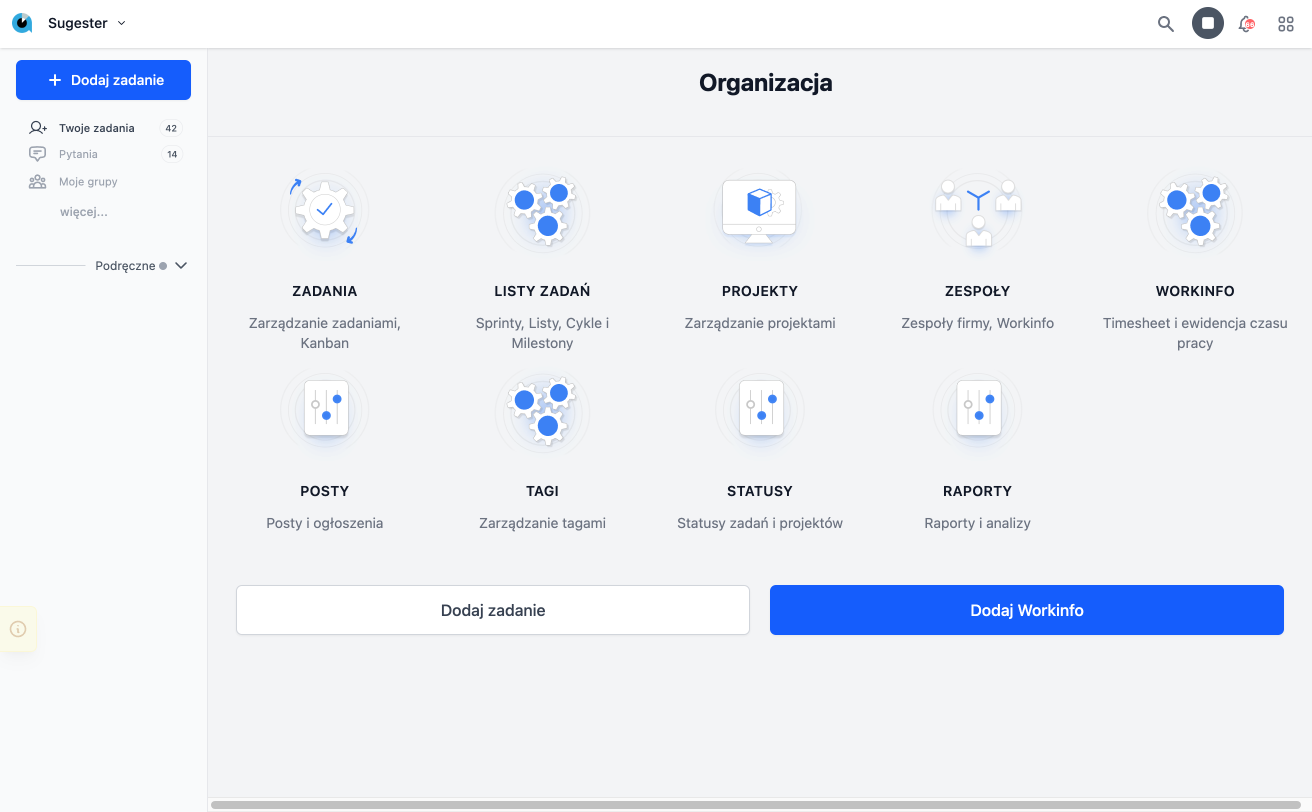
The Organization module is responsible for organizing work within the company and is the first area we encounter after logging into the system. The Dashboard displays options related to task and time management. The system offers a clear view of key information, allowing users to quickly start working and have immediate access to the most important functions. The Organization is designed to support daily work processes in both small teams and large companies.
Tasks
By clicking on the tasks icon, we access the main list of tasks assigned to the user. This list also allows viewing tasks of colleagues through search options. Thanks to the intuitive interface, it is possible to quickly browse tasks, add comments, and update statuses. The module also enables sorting tasks by priority or deadlines, making management easier in a dynamic work environment.
Task Lists
The Task Lists area allows for managing tasks in the context of deadlines and teams. An example could be the list "Tasks for December 2024 for Marketing." This enables precise work planning and monitoring of progress towards goals. The system allows for creating custom lists tailored to the specifics of work in the company. This feature also supports collaboration between teams, ensuring that all tasks are well-organized and clear.
Projects
With Projects, you can manage tasks in the context of the scope of work. For example, you can create a project "Implementation of a new knowledge base module," which allows grouping tasks by a common goal. Projects facilitate tracking progress, assigning responsibilities, and identifying potential delays.
Teams
By clicking the Teams icon, the user gains access to options related to dividing employees into specific teams and settings for each team. The module allows for creating organizational structures. This functionality also enables easy management of task assignments and access to specific resources in the system.
Posts
Posts is a new feature in Sugester that allows for publishing internal announcements, tips, or guidelines for employees. With this feature, all team members can stay up to date with the latest information. Posts can be assigned to specific teams. This feature also supports building organizational culture through transparent communication.
Workinfo
The Workinfo module allows for recording working time, just like in the previous version of Sugester. This tool enables precise tracking of worked hours and analysis of activity efficiency. Workinfo can be used for both billing purposes and optimizing employee workloads.
WorkInfo Reports
Using the WorkInfo Reports functionality, you can generate a work report for a given month and then submit it for approval and billing. The system automatically analyzes the data, allowing for quick preparation of the documentation necessary for settlements.
Tags
Tags allow for quickly and easily categorizing tasks according to various criteria. They enable the extraction of tasks with similar scope or patterns among many task lists and projects. This feature also supports the identification of recurring issues, allowing for the optimization of work input in a given area.
Settings
By going to Settings, the user receives options related to configuring statuses by which tasks are marked, e.g., new, in progress, or approved. Customizing statuses allows for a complete reflection of the company's internal processes in the system. This module also offers management of notifications and other personalization elements, enhancing user convenience.