What is the Response Assistant?
The Response Assistant is an AI tool that helps you respond to customer emails more quickly. Based on the content of the email, it suggests a ready-made response and shows matching templates and articles from the knowledge base.
How to use it?
1. Open the email
Go to the email view that you want to reply to.
2. Click the “Suggest a response” button
At the very bottom of the page, under the email thread, you will find the button Suggest a response to this email. After clicking, the assistant will analyze the content of the message.
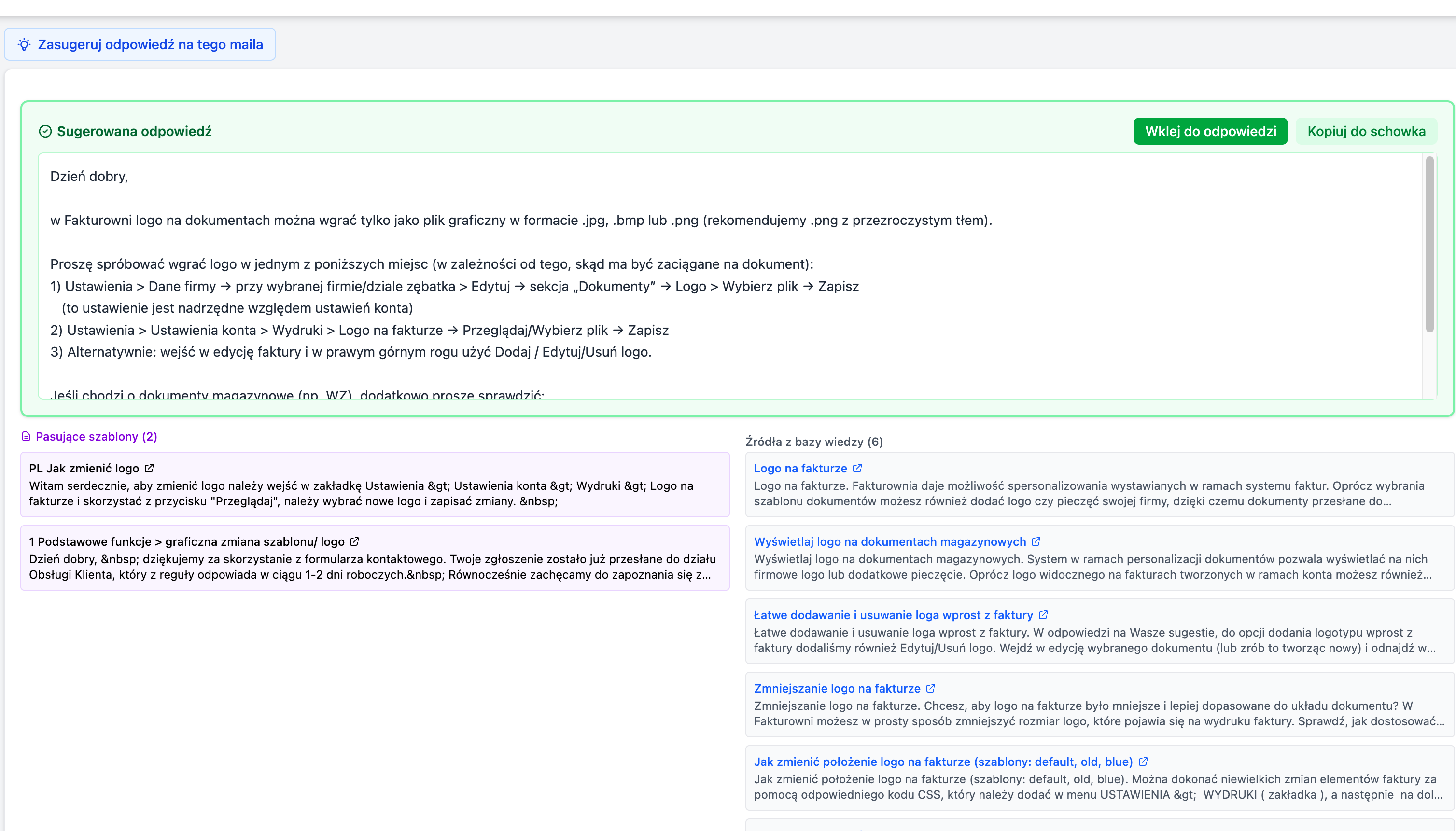
3. Receive a suggestion
The assistant will display:
- Suggested response - a ready text that you can copy and paste
- Matching templates - email templates tailored to the topic
- Sources from the knowledge base - helpful articles related to the customer’s question
4. Copy and send
Click Copy next to the suggested response or the selected template. The text will be copied to the clipboard - just paste it into your reply.
Tips
- Check before sending - always read the suggestion before sending, as the AI may not know all the details
- Customize the response - the suggestion is a starting point; you can edit and supplement it
- Use sources - you can include links to the knowledge base in your response to the customer
Where can I find this feature?
The assistant is available in the single email view, at the very bottom of the page under the thread. If you don’t see it, make sure you have the NOE Applications module enabled in your account settings.